Most people try to save money by purchasing used or second-hand iPhones. But a post-reset, the device might request the previous owner’s Apple ID. It is referred to as Bypass iCloud Activation Lock, and it is quite an annoying issue.
This article will explain the reasons for such a lock, the legitimate choices available to you, and the proper way to unlock a used iPhone. We will also share with you the importance of following legal routes in order to stay clear of problems or damage to your device.

What Is iCloud Activation Lock?
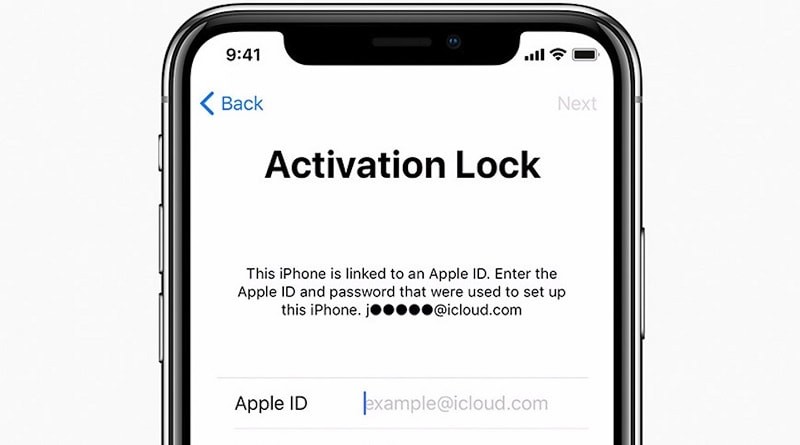
Apple guards iPhones through the use of iCloud Activation Lock. It is a feature that gets enabled automatically if “Find My iPhone” is switched on. After turning on, the device gets linked with the owner’s Apple ID.
Apple asks for the same Apple ID and password during a reset of the iPhone. It is a method of thwarting a thief from the use of a stolen phone. A device that has been wiped cannot be used if the correct login credentials are missing.
Apple protects photographs, texts, and accounts with Activation Lock by default. It runs softly, so many users don’t notice until a reset.
Activation Lock is not iCloud login. iCloud login syncs data and services. Activation Lock prevents device setup until the correct Apple ID is entered.

Why Used or Second-Hand iPhones Get Activation Locked
Activation Lock is helpful for security, but it often causes problems for used iPhone buyers.
- One common reason is that the previous owner forgot to remove their Apple ID before selling the phone. Even if the phone looks clean, the lock stays hidden until a reset is done.
- Another reason is an incorrect factory reset. If the phone is wiped without signing out of iCloud first, Activation Lock will appear during setup.
- Phones bought from unofficial sellers also face this issue. These sellers may not fully check the device before selling it. Sometimes, the phone was never cleared properly.
- Refurbished or lost devices can also be locked. If verification was incomplete, Apple keeps the lock active to protect the original owner. This is why checking Activation Lock before buying is always important.
Things to Check Before Attempting to Unlock Activation Lock
Below is a list of things one should check before bypassing activation lock.
First, confirm device ownership and purchase proof.
Make sure the iPhone truly belongs to you. Keep any receipt, invoice, or seller message. This proof matters, especially if you contact Apple or use professional tools.
Next, check the iPhone model and iOS version.
Not all unlocking methods work on every device. Some tools support only certain iPhone models or iOS versions. Knowing this early saves time.
Then, understand the method’s limits.
Each unlocking option has rules. Some need the old owner. Some work only online. Others may limit phone calls or iCloud features.
Finally, think about data and features.
Unlocking may erase data or limit cellular use on some devices. Always know what you may lose before starting.
Methods to Remove iCloud Activation Lock
Now that you know what to check, let’s look at the safest and most common ways to remove Activation Lock.
Contacting the Previous Owner
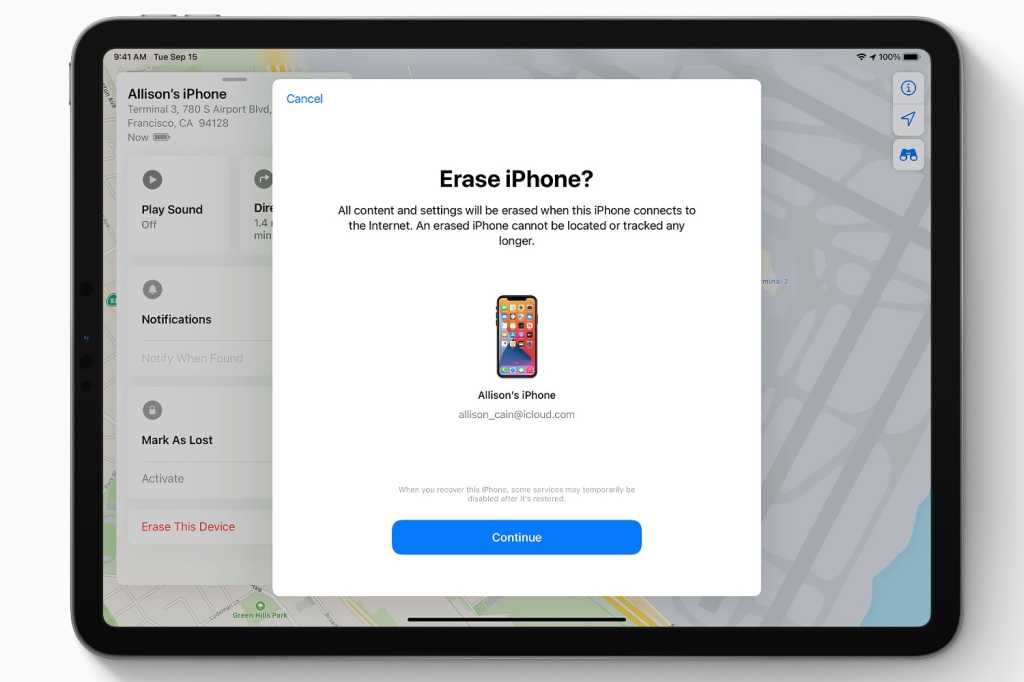
This is easy and safer with the original owner’s cooperation. Request that the previous owner delete the device from iCloud. They can do this remotely, even far away.
Follow these steps:
Step 1. Open iCloud.com on your PC.
Step 2. Enter Apple ID and password.
Step 3. Click Find iPhone. Select the iPhone to wipe under “All Devices”.
Step 4. Select “Erase this device.” You can create a new Apple ID by removing the iPhone from the account.

Requesting Help from Apple Support
If the old owner is not reachable, Apple may help in some cases. Apple Support can remove Activation Lock if you prove ownership.
What you need:
- Original purchase receipt
- iPhone IMEI or serial number
- Valid ID in some regions
Important limits:
Apple may refuse if the proof is weak or missing. Approval can take days or weeks. Apple also rejects requests for lost or stolen devices.
Unlocking iCloud Activation Lock with Dr.Fone
Many people rely on trusted software when other solutions fail. For legally owned iPhones locked out, Dr.Fone – Screen Unlock (iOS)is designed. It restores access without the Apple ID or password.
Dr.Fone Screen Unlock (iOS) presents an effective way to get around an iCloud Activation Lock without needing the original Apple ID or password. If you have lost your iCloud login details or got a used iPhone or iPad that is still connected to the previous owner’s account, Dr.Fone will aid you in unlocking the Activation Lock in a simple and safe manner.
How Dr.Fone Helps Bypass iCloud Activation Lock
If you possess an iPhone or iPad stuck on the Activation Lock screen, Dr.Fone – Screen Unlock (iOS) can help you unlock it safely. It supports iPhone XS to iPhone 17 series, iPads from 2019, and iOS/iPadOS versions up to iOS 26.
Step 1. Download and install the latest Wondershare Dr.Fone. Launch “Toolbox > Screen Unlock > iOS,” then select “iCloud Activation Lock Removal.”

Step 2. Connect your iPhone or iPad to the PC via USB. Dr.Fone will identify and describe your gadget. Verify the information.
Step 3. Click “Start or Unlock Now” to begin. Read and accept the warning, then let the tool download the files. Keep your device linked.

Step 4. Please wait as Dr.Fone removes the Activation Lock. The device being used may restart several times. You may then set up and utilize that device.


Key Features and Benefits
- High success rate on supported devices
- Step-by-step guidance, easy for beginners
- Trusted Wondershare platform with years of experience
- Works well for used and second-hand iPhones
- Supports iOS/iPadOS 26 and iPhone 17 series
- No great technical skills needed
- Dr.Fone also helps with other locks like screen passcodes, Apple ID removal, MDM locks, and Screen Time limits. The interface is clean, simple, and safe to use.
Common Mistakes to Avoid When Unlocking a Used iPhone
Before trying to unlock a used iPhone, it helps to know what mistakes to avoid. This keeps your phone safe and saves time.
- Jailbreaking without knowing the risks can break system features and cause update problems.
- Using unknown software or random websites may bring viruses or steal your data.
- Falling for IMEI unlock scams often leads to money loss with no real result.
- Skipping compatibility checks can make tools fail or damage the phone setup.
Legal and Ethical Considerations
Only unlock iPhones you own or have permission to use. Local and Apple policies must be followed because laws vary by country. Apple won’t unlock lost or stolen smartphones. Legal issues may arise while unlocking blacklisted phones. Always verify phone history before buying. Honesty safeguards you and your device.
Final Thoughts
Removing an iCloud Activation Lock from a used iPhone can be very easy if you rely on a right method. If only, you had no avail with Apple Support or the previous owner, you would have a solid, safe, and straightforward alternative in Dr.Fone Screen Unlock (iOS). The tool is up to the latest iOS versions, thus, you can have the great success rates plus the added trust that Wondershare is a brand well-known for the quality of their products. Dr.Fone is definitely a partner that you can count on to have your iPhone come back to you just like new and without any doubt.
-

-

-

-
-

-
-

-

-

-