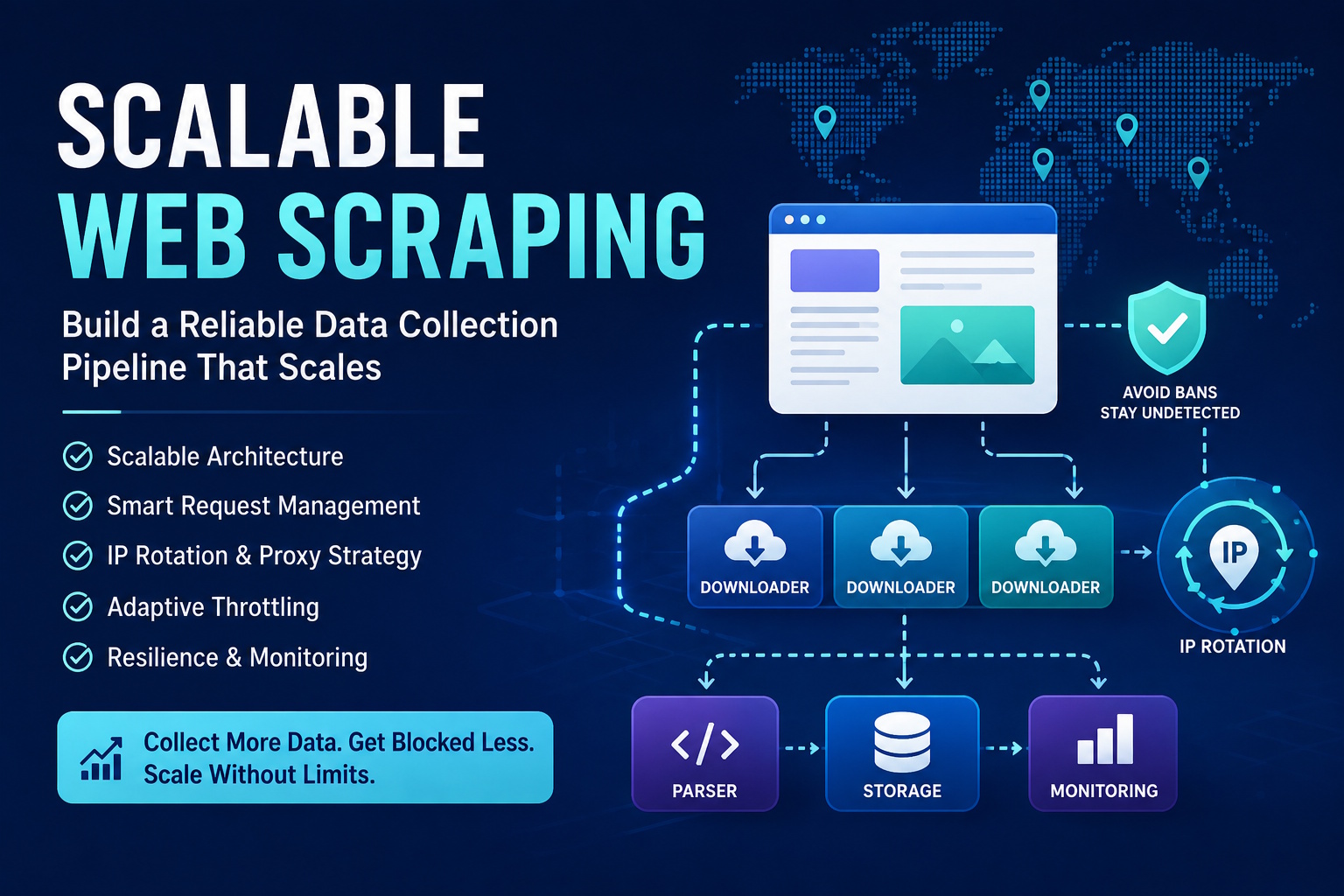
A field-tested guide to collecting web data at scale while keeping your infrastructure healthy and your IP reputation intact.
Web scraping stopped being a script you run on your laptop years ago. If you’re pulling data from more than a few hundred pages a day, you’ve probably already hit the wall: 403s, endless CAPTCHAs, rate-limit headers, and eventually a hard IP ban that kills your workflow for hours.
This is a practical blueprint for building a scraping pipeline that can handle thousands to millions of requests without falling over — architecture, request management, ethical throttling, and the factor most pipelines get wrong first: how you rotate your egress IPs.
1. The Architecture of a Scalable Pipeline
Before writing any code, it helps to define the moving parts. A production-grade scraping pipeline generally has four layers:
| Layer | Responsibility | Key Tooling |
|---|---|---|
| Queue | URL discovery, deduplication, priority | Redis, RabbitMQ, AWS SQS |
| Downloader | HTTP execution, session handling, retries | httpx, aiohttp, requests |
| Parser | HTML/JSON extraction, validation | BeautifulSoup, lxml, parsel |
| Storage & Monitor | Persistence, metrics, alerting | PostgreSQL, S3, Prometheus/Grafana |
The most common mistake in early-stage pipelines is coupling all four layers into a single script. That works fine at 1,000 pages. It collapses at 100,000.
Decouple With a Message Queue
Use Redis or RabbitMQ as a URL queue. The downloader pulls jobs from it, executes them, and pushes raw responses to a second queue for parsing. Splitting things up this way pays off in a few concrete ways: you can scale downloaders and parsers independently — ten downloader workers and two parser workers if the bottleneck is network latency; a parser crash doesn’t lose data, since downloaded pages just sit in the queue until it recovers; and queue depth becomes something you can actually watch in real time and scale ahead of, instead of finding out about a backlog after it’s already a problem.
Here’s a minimal Redis-backed queue using Python and Celery:
from celery import Celery
from bs4 import BeautifulSoup
import httpx

app = Celery('scraper', broker='redis://localhost:6379/0')

@app.task(bind=True, max_retries=3)
def fetch_page(self, url: str):
    try:
        response = httpx.get(url, timeout=30, follow_redirects=True)
        response.raise_for_status()
        parse_page.delay(response.text, url)
    except httpx.HTTPStatusError as exc:
        if exc.response.status_code == 429:
            # Back off and retry
            raise self.retry(countdown=60)
        raise

@app.task
def parse_page(html: str, source_url: str):
    soup = BeautifulSoup(html, 'lxml')
    title = soup.find('title')
    # ... extract and persist data
2. Request Hygiene: The Basics That Actually Matter
Most blocking isn’t sophisticated. Sites flag scrapers because the scrapers look obviously automated. It’s worth fixing the basics before reaching for heavier tooling.
Rotate Realistic Headers
Don’t just rotate User-Agent. Rotate the full header signature — Accept-Language, Accept-Encoding, Sec-Ch-Ua, Referer — and keep them internally consistent. If you’re sending a Chrome 124 user agent, Sec-Ch-Ua needs to say Chrome 124 too; mismatched signatures are an easy tell.
import random

HEADERS_POOL = [
    {
        "User-Agent": "Mozilla/5.0 (Windows NT 10.0; Win64; x64) AppleWebKit/537.36 (KHTML, like Gecko) Chrome/124.0.0.0 Safari/537.36",
        "Accept": "text/html,application/xhtml+xml,application/xml;q=0.9,image/webp,*/*;q=0.8",
        "Accept-Language": "en-US,en;q=0.5",
        "Accept-Encoding": "gzip, deflate, br",
        "Sec-Ch-Ua": '"Chromium";v="124", "Google Chrome";v="124"',
        "Sec-Ch-Ua-Mobile": "?0",
        "Sec-Ch-Ua-Platform": '"Windows"',
        "Referer": "https://www.google.com/"
    },
    # ... add 8-10 more realistic signatures
]

def get_headers():
    return random.choice(HEADERS_POOL)
Handle Cookies Like a Browser
Sites often plant challenge cookies on the first visit and check for them on later requests. Use a persistent cookie jar per session and respect Set-Cookie headers — httpx handles this natively:
client = httpx.Client(
    headers=get_headers(),
    cookies=httpx.Cookies(),
    http2=True,  # Many modern WAFs expect HTTP/2
    follow_redirects=True
)
Implement Adaptive Delays
A fixed time.sleep(2) is nearly always wrong in one direction or the other — too slow and you’re wasting throughput, too fast and you’re triggering bans. Base the delay on the response instead:
import asyncio

async def adaptive_fetch(client, url, base_delay=1.5):
    response = await client.get(url)

    if response.status_code == 429:
        # Exponential backoff on rate limit
        await asyncio.sleep(base_delay * 2 ** attempt)
    elif response.status_code == 200:
        # Slightly randomize success delays to avoid pattern detection
        await asyncio.sleep(base_delay + random.uniform(0, 1))

    return response
3. IP Rotation: The Make-or-Break Layer
Even perfect headers and polite delays won’t save a pipeline if every request comes from the same datacenter IP block. Modern WAFs — Cloudflare, DataDome, PerimeterX — maintain reputation scores for entire IP ranges, and a single datacenter IP sending a thousand requests an hour is a flag on its own, independent of anything else about the request.
The IP Trust Hierarchy
Not all IPs read the same way to a target site. Datacenter IPs are cheap and fast, but trivially detectable — fine for internal APIs or unprotected targets, not much use against real anti-bot systems. ISP or static residential IPs are assigned by real ISPs but physically hosted in datacenters, which gets them a better trust score than pure datacenter ranges, though they’re still clustered enough to be detectable. Rotating residential IPs sit at the top of that hierarchy because they’re genuine consumer connections — real people’s home internet, carrying the routing history and ASN reputation that comes with it.
That last point is the part worth dwelling on: the advantage of a residential proxy network isn’t just that the IPs are diverse, it’s that each one arrives with the network history of an actual household connection rather than a server rack.
Implementing Rotation in Python
Most providers expose a single endpoint that handles rotation automatically — the work on your end is routing requests through it and managing session stickiness when a workflow needs to hold state (staying logged in across several requests, for example).
import httpx

PROXY_ENDPOINT = "http://user:[email protected]:10000"

async def fetch_with_rotation(url: str, sticky_session: bool = False):
    proxy = PROXY_ENDPOINT
    if sticky_session:
        session_id = random.randint(100000, 999999)
        proxy = f"{PROXY_ENDPOINT}?session={session_id}"

    async with httpx.AsyncClient(
        proxies={"http://": proxy, "https://": proxy},
        headers=get_headers(),
        http2=True,
        timeout=30
    ) as client:
        response = await client.get(url)
        return response
Sticky sessions make sense for login flows, checkout processes, and paginated results — anywhere continuity matters. Full per-request rotation is the better fit for product listing pages, SERP monitoring, and price checks, where each page stands on its own.
Monitoring Proxy Health
Track the success rate per proxy endpoint. If a specific IP or ASN starts coming back with 403s, retire it for 24 hours and rotate to a fresh pool rather than continuing to hammer it:
from collections import defaultdict

proxy_stats = defaultdict(lambda: {"success": 0, "fail": 0})

def record_result(proxy_ip: str, success: bool):
    key = "success" if success else "fail"
    proxy_stats[proxy_ip][key] += 1

    # If fail rate > 30% over last 50 requests, retire this IP
    total = sum(proxy_stats[proxy_ip].values())
    if total > 50 and proxy_stats[proxy_ip]["fail"] / total > 0.3:
        retire_ip(proxy_ip)
4. Resilience Patterns for Production
Circuit Breaker for Dead Domains
If a domain starts returning 503s for five minutes straight, stop hammering it. A circuit breaker that pauses requests to that host for a cooldown period keeps a single struggling target from eating your whole worker pool:
from datetime import datetime, timedelta
from urllib.parse import urlparse

circuit_breakers = {}

async def safe_fetch(client, url: str):
    domain = urlparse(url).netloc

    if domain in circuit_breakers:
        if datetime.now() < circuit_breakers[domain]:
            raise CircuitOpenError(f"Circuit open for {domain}")

    try:
        resp = await client.get(url)
        if resp.status_code >= 500:
            circuit_breakers[domain] = datetime.now() + timedelta(minutes=10)
        return resp
    except httpx.NetworkError:
        circuit_breakers[domain] = datetime.now() + timedelta(minutes=5)
        raise
Content Fingerprinting for Block Pages
A 200 OK doesn’t guarantee you got the data. Plenty of sites serve a “successful” response that’s actually a CAPTCHA or a block message wearing the site’s normal layout. Fingerprinting the expected DOM structure and validating against it catches this:
def is_real_product_page(html: str) -> bool:
    soup = BeautifulSoup(html, 'lxml')
    # If the page is missing the price container, it's likely a block page
    return bool(soup.select_one('[data-testid="product-price"]'))
If validation fails, retry with a fresh IP and rotated headers rather than trusting the response.
5. Storage and Observability
Store Raw HTML Before Parsing
Archive raw responses to S3 or similar object storage before parsing them. When the parser hits an edge case, or the site redesigns its HTML entirely, you can replay historical data instead of re-scraping everything from scratch.
import boto3
import gzip

s3 = boto3.client('s3')

def archive_response(url: str, html: bytes, status_code: int):
    key = f"raw/{datetime.now().isoformat()}/{hash(url)}.html.gz"
    s3.put_object(
        Bucket='scraper-archive',
        Key=key,
        Body=gzip.compress(html),
        Metadata={'source-url': url, 'status': str(status_code)}
    )
Metrics That Matter
Four numbers are worth exporting to Prometheus or whatever monitoring stack you’re running: overall requests per minute, the success rate of responses that actually pass content validation (not just return 200), the block rate across 403s, 429s, and challenge pages, and queue depth — with an alert if it’s growing faster than your workers can drain it.
6. Ethics and Legal Guardrails
Scraping is a powerful tool, but it’s not a free pass. A few habits keep a pipeline sustainable and defensible over time: respect robots.txt even where it isn’t legally binding, since ignoring it signals bad faith if things ever get scrutinized; honor a Crawl-Delay directive or reach out for permission if it’s blocking what you need; go easy on small sites specifically — a local retailer on shared hosting can’t absorb 100 requests a second the way a major platform can; and actually check a site’s Terms of Service, since some platforms prohibit scraping outright.
Conclusion
Building a scalable scraping pipeline isn’t about finding one magic library that bypasses every protection. It’s about layering defenses: realistic request behavior, adaptive throttling, solid error handling, and — the piece that decides whether the whole thing survives contact with a serious target — a diverse, high-trust IP rotation strategy.
Start with the architecture. Decouple the queue from the downloader. Fix headers and cookies. Add adaptive delays. Then, once you’re past the point where datacenter IPs get burned within minutes, moving to residential proxy infrastructure is usually what buys the geographic coverage and session flexibility to keep collecting data reliably against tougher anti-bot setups.
The sites you scrape will keep evolving their defenses. Build the pipeline to evolve with them.