
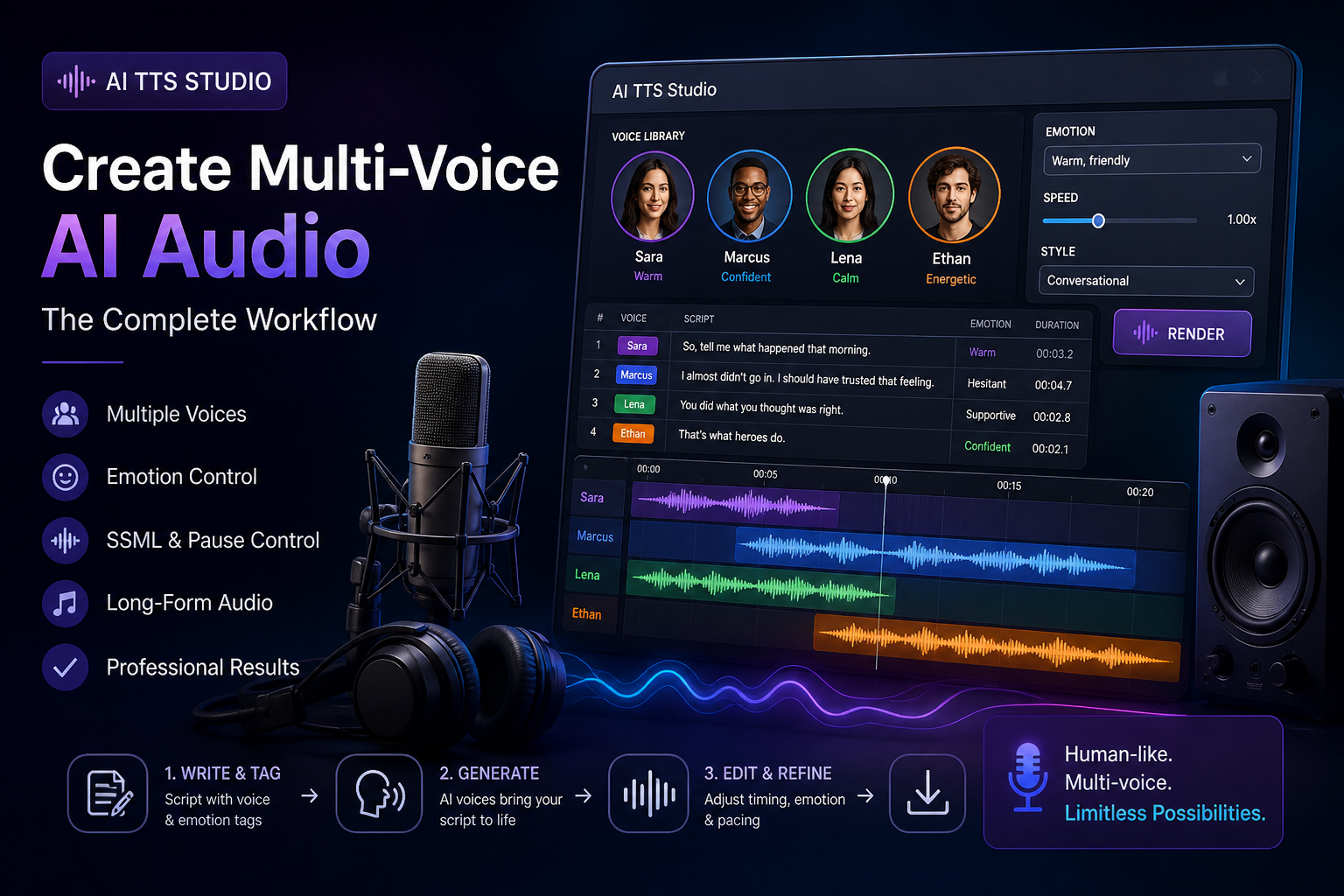
Most AI voice work starts with a single voice reading a single block of text. That’s the baseline use case, and most TTS tools handle it well. The problems start when you need multiple voices in conversation, or a single voice with consistent emotional variation, or a long-form delivery that can’t sound like 200 separate clips stitched together.
The creators who produce serious multi-voice AI audio (dialogue podcasts, audio dramas, multi-character explainers, narrated content with character dialogue) have settled into workflows that handle the multi-voice problem inside a single tool rather than juggling separate accounts and exports.
Here’s how that workflow actually works.
Pick a TTS studio that supports multiple cloned voices
The first decision is which tool to commit to. Most modern TTS platforms (ElevenLabs, OpenAI’s voice tools, the voice modules inside all-in-one creator studios) support multiple voices in one project, but the depth of support varies.
What to look for:
- Project-scoped voice library. Multiple voices saved per project, not just one cloned voice at a time.
- Per-line voice selection. The ability to assign different lines of text to different voices in a single render.
- Consistent emotional direction across voices. The emotion controls work the same way across all voices, not differently for each one.
- Long-form rendering. Stitching dozens of lines into one continuous audio file with the right pacing.
A working AI TTS Studio workflow is built on a tool that handles all of these in one place rather than forcing exports between tools.
Build the voice library before the script
Most creators jump straight into scripting and discover voice problems mid-production. The faster pattern is to build the voice library first.
Generate or clone the voices you’ll use. Test each one at conversational length, not just the demo clip. Test them in dialogue with each other to see whether the voices distinguish well. Adjust until each voice has a clear identity.
A useful test: read the same paragraph in each voice. The voices should produce the same content with meaningfully different deliveries, not slight tonal variations of each other.
Tag the script for voice and emotion
For multi-voice work, the script needs to be more than just text. It needs voice tags and emotion tags per line. Most working creators use a simple format like:
[Voice: Sara] [Emotion: warm] So tell me what happened that morning.
[Voice: Marcus] [Emotion: hesitant, then resolute] I almost didn’t go in. I should have trusted that feeling.
The TTS tool reads the tags and assigns the right voice and emotion to each line. The format may vary by tool, but the principle is the same: structured script, not just text.
Direct emotion at the line level
Generic delivery across an entire long script sounds robotic. Line-by-line emotion direction sounds human. Tag each line for the emotional register you want.
This sounds tedious. In practice, most creators tag emotion only on the lines that need it (key moments, shifts, beats) and let the default register handle the connective text. The result is a delivery with intentional emotional shape rather than uniform tone.
Use SSML or equivalent pause control
Speech Synthesis Markup Language (SSML) and similar systems let you insert specific pauses, emphasize specific words, control pitch on specific syllables. Use them.
A pause between two lines in dialogue is the difference between two characters talking past each other and two characters actually responding to each other. A small emphasis on a specific word makes the delivery feel intentional rather than generic.
The investment in learning the pause and emphasis controls is small and the payoff in audio quality is large.
Render in chunks, then assemble
Even tools that support long-form rendering benefit from a chunked workflow. Render scenes or sections, listen back, adjust, re-render the sections that need it.
Trying to render 30 minutes of audio in one shot and then finding a problem in minute 18 means redoing the whole render. Rendering in chunks of 2-5 minutes lets you fix problems locally without redoing everything.
Match the audio environment
Multi-voice dialogue benefits from a coherent audio environment. Voices that all sit in the same acoustic space (similar room tone, similar reverb, similar mic distance) feel like real conversation. Voices with mismatched audio environments feel like clips stitched together.
If your TTS tool doesn’t handle this natively, do it in post. Apply consistent room tone underneath all voices. Match the reverb characteristics. The result is dialogue that feels like it’s happening in one place rather than across different recording booths.
Layer in non-voice audio
Multi-voice work usually benefits from non-voice audio: ambient sound, music, sound effects. Layer these in deliberately rather than as decoration.
A scene set in a coffee shop with no coffee shop background audio feels staged. The same scene with subtle coffee-shop ambient feels real. The non-voice audio is doing as much work as the voices in establishing place.
Test the dialogue handoffs
The hardest moments in multi-voice dialogue are the handoffs between voices. Listen specifically to the transitions. Do they feel like one character actually responding to another? Or do they feel like two separate readings stitched together?
If the handoffs feel off, the most common fixes are: shorten or lengthen the pause between lines, adjust the emotion of the responding line to actually respond to the previous line, re-render with slightly different pacing.
Build a reusable voice asset library
For creators producing serial content with recurring characters, the voice work is reusable. Save each voice with the settings that worked. Save the emotion tags that produced the right deliveries. The next project starts from a much better baseline.
Over time, the asset library becomes more valuable than any single project. The fifth episode of a series is faster to produce than the first because the voice work is already tuned.
Automate the rendering queue
For long projects with many lines, manual rendering one line at a time is slow. Most working tools support batch rendering: queue 100 lines with their voice and emotion tags, hit render, come back when it’s done.
This is the pattern that lets a single creator produce a full-length audio drama in a reasonable timeline. Batch rendering plus a chunked review pattern means most of the human time is spent on direction and quality, not on waiting.
What still doesn’t quite work
Two honest limitations:
- Realistic overlap. Real conversation has overlapping speech, interruptions, and simultaneous reaction sounds. Most TTS workflows handle these poorly.
- Singing. Use a different tool category for music.
For everything else (multi-character dialogue, narrated content with character voices, audio drama at scale, multi-voice explainers) the TTS workflows have matured enough that one creator with the right tool can produce work that previously required a voice cast.
The creators producing the strongest multi-voice AI audio in 2026 are the ones who have committed to one studio with deep multi-voice support and built the workflows above into their default production process.
-

-

-

-

-

-

-

-

-

-

